
Cloud Security Best Practices Every Business Should Follow
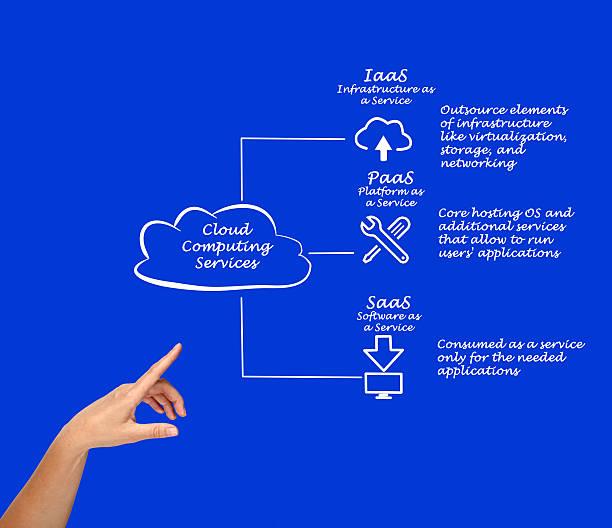
Cloud computing has fundamentally changed how businesses operate. Organizations of all sizes now rely on cloud platforms to store data, host applications, collaborate remotely, and scale their operations. Services such as Software as a Service (SaaS), Platform as a Service (PaaS), and Infrastructure as a Service (IaaS) have enabled companies to reduce infrastructure costs while improving flexibility and efficiency.
However, this rapid adoption has also introduced new security challenges. Cybercriminals increasingly target cloud environments because they often contain valuable customer information, financial records, intellectual property, and mission-critical applications. Misconfigured cloud resources, weak passwords, poor access controls, and insecure APIs have become common causes of data breaches.
Cloud security is therefore no longer just the responsibility of IT departments—it is a business priority. Every organization, regardless of size or industry, should implement robust security measures to protect its cloud infrastructure and sensitive information.
This guide explores the most effective cloud security best practices, common threats, emerging trends, and practical steps every business can take to reduce risk and build a secure cloud environment.
What Is Cloud Security?
Cloud security refers to the policies, technologies, controls, and procedures used to protect cloud-based systems, applications, and data from unauthorized access, cyberattacks, and accidental loss.
Cloud security involves protecting:
- Cloud applications
- Virtual machines
- Cloud databases
- User accounts
- APIs
- Storage services
- Network infrastructure
A comprehensive cloud security strategy combines technology, governance, and user awareness.
Why Cloud Security Matters
Businesses increasingly depend on cloud services for day-to-day operations. A security incident can lead to:
- Data breaches
- Financial losses
- Regulatory penalties
- Business disruption
- Reputational damage
- Loss of customer trust
Implementing strong cloud security practices helps reduce these risks and supports long-term business resilience.
Common Cloud Security Threats
Understanding potential threats is the first step toward building effective defenses.
Data Breaches
Unauthorized access to sensitive information remains one of the most serious cloud security risks.
Misconfigured Cloud Resources
Incorrect storage permissions or exposed services can unintentionally make confidential data publicly accessible.
Account Hijacking
Weak passwords, stolen credentials, or phishing attacks can allow attackers to gain access to cloud accounts.
Insider Threats
Employees or contractors with excessive privileges may intentionally or accidentally compromise sensitive data.
Insecure APIs
Many cloud applications communicate through APIs. Poorly secured APIs can expose systems to unauthorized access.
Malware and Ransomware
Attackers may encrypt or steal cloud-hosted data, disrupting operations and demanding payment for restoration.
1. Enable Multi-Factor Authentication (MFA)
Passwords alone are no longer sufficient.
Multi-Factor Authentication requires users to verify their identity using an additional factor such as:
- Authentication apps
- Security keys
- Biometrics
- One-time verification codes
MFA significantly reduces the risk of account compromise.
2. Implement Strong Access Control
Follow the Principle of Least Privilege (PoLP).
Users should receive only the permissions necessary to perform their responsibilities.
Benefits include:
- Reduced attack surface
- Lower insider risk
- Better compliance
- Easier auditing
Regularly review and remove unnecessary privileges.
3. Encrypt Data
Encryption protects information whether it is stored or transmitted.
Businesses should encrypt:
- Databases
- Cloud storage
- Backups
- API communications
- Emails containing sensitive data
Even if attackers gain access, encrypted data is far more difficult to misuse.
4. Regularly Back Up Critical Data
Backups are essential for business continuity.
Best practices include:
- Automated backups
- Multiple backup copies
- Geographic redundancy
- Regular recovery testing
Reliable backups help organizations recover from accidental deletion, hardware failures, and ransomware attacks.
5. Keep Software Updated
Outdated software often contains vulnerabilities that attackers exploit.
Regularly update:
- Operating systems
- Cloud applications
- Virtual machines
- Containers
- Security tools
Automated patch management can simplify this process.
6. Monitor Cloud Activity Continuously
Continuous monitoring helps identify suspicious behavior before it becomes a major incident.
Monitor for:
- Unusual login attempts
- Unexpected data transfers
- Privilege escalation
- Configuration changes
- Failed authentication attempts
Security Information and Event Management (SIEM) platforms can centralize monitoring and alerting.
7. Secure APIs
Because APIs connect cloud services, they require strong protection.
Best practices include:
- Authentication
- Authorization
- Input validation
- Rate limiting
- HTTPS encryption
- API monitoring
Regular API security testing helps identify weaknesses early.
8. Train Employees
Human error remains a leading cause of security incidents.
Employee training should cover:
- Phishing awareness
- Password hygiene
- Secure file sharing
- Safe remote work practices
- Incident reporting procedures
A well-informed workforce is one of the strongest defenses against cyber threats.
9. Adopt a Zero Trust Security Model
Zero Trust operates on the principle of "never trust, always verify."
Instead of automatically trusting users inside the network, every access request is verified based on identity, device health, and context.
Zero Trust helps reduce the impact of compromised accounts.
10. Conduct Regular Security Assessments
Routine security assessments help identify weaknesses before attackers do.
Assessments may include:
- Vulnerability scanning
- Penetration testing
- Configuration reviews
- Compliance audits
- Risk assessments
Continuous improvement is key to maintaining a strong security posture.
Cloud Security Best Practices Checklist
Use this checklist to strengthen your cloud environment:
- Enable MFA for all accounts.
- Enforce strong password policies.
- Apply the Principle of Least Privilege.
- Encrypt sensitive data.
- Perform regular backups.
- Patch software promptly.
- Monitor logs continuously.
- Secure APIs.
- Train employees regularly.
- Test disaster recovery plans.
Review this checklist periodically to adapt to evolving threats.
Compliance and Regulations
Depending on your industry, cloud security may also involve compliance with regulations such as:
- General Data Protection Regulation (GDPR)
- Health Insurance Portability and Accountability Act (HIPAA)
- Payment Card Industry Data Security Standard (PCI DSS)
- ISO/IEC 27001
Meeting regulatory requirements helps protect customer data and avoid legal penalties.
Emerging Trends in Cloud Security
Cloud security continues to evolve with technology.
Key trends include:
- AI-powered threat detection
- Cloud-native application protection platforms (CNAPP)
- Secure Access Service Edge (SASE)
- Extended Detection and Response (XDR)
- Confidential computing
- Passwordless authentication
- Automated compliance monitoring
Businesses that embrace these innovations can improve resilience and respond more effectively to modern threats.
Frequently Asked Questions
What is the biggest cloud security risk?
Misconfigured cloud resources remain one of the leading causes of cloud-related security incidents because they can unintentionally expose sensitive data.
Is cloud storage secure?
Yes, when combined with strong security practices such as encryption, MFA, regular monitoring, and access controls.
Who is responsible for cloud security?
Cloud security follows a shared responsibility model. Cloud providers secure the underlying infrastructure, while customers are responsible for protecting their data, identities, applications, and configurations.
Why is MFA important?
MFA provides an additional layer of security, making it significantly harder for attackers to access accounts using stolen credentials.
Can small businesses benefit from cloud security?
Absolutely. Small businesses are frequent targets of cyberattacks and should implement the same foundational security practices as larger organizations.
Conclusion
Cloud computing offers tremendous flexibility, scalability, and cost savings, but it also introduces new security responsibilities. Businesses must recognize that protecting cloud environments requires more than relying on the cloud provider's infrastructure. Strong access controls, encryption, continuous monitoring, secure APIs, employee awareness, and regular security assessments all play critical roles in reducing cyber risk.
By adopting these cloud security best practices, organizations can safeguard sensitive information, maintain customer trust, support regulatory compliance, and ensure business continuity in an increasingly connected digital world.
Recent Insights

Student Reviews
Authentic experiences and reviews from our global training alumni will be displayed right here shortly.
Global Cohort
Advance From Foundation To Technical Leadership
Secure your specialized path tracker in Cyber Analytics, Data Science, or Cloud Systems Engineering.
Join Training Track